Here is a list of question, from the past interviews, for individuals who are preparing for their interview with some answer. if you want to get selected you must know all these.
1. Explain the difference between abstract class and interface.
2. How can you use abstract class and interface?
3. In code behind class, name the type of code found. Is it the server side code or client side code?
4. What do you mean by sealed classes and static classes?
5. Give a few examples of page life cycle events.
6. Explain http handlers? Where we can use the http handlers?
7. Explain the difference between user control and custom control. Also, explain their use.
8. What do you mean by web service?
9. In .Net, what is an assembly? Also explain the type of assembly.
10. In C#, explain the difference between overloading and overriding.
11. Explain the difference between boxing and unboxing.
12. Explain the use of SN.exe
13. What do you mean by shared assembly?
14. Explain briefly the difference between value type and reference type.
15. Can you explain what do you understand about web service?
16. What do you mean by serialization?
17. Explain the types of indexes.
18. What can we do to handle multiple exceptions?
19. Explain copy constructor.
20. In asp.net, how can you validate drop down box?
21. Explain the types of Polymorphism.
22. Explain the features that are common to all .Net languages.
23. What is a .exe extension files? How is it similar to .dll extension files?
WCF interview question level experienced
What is Data Contract in WCF?
What are the Instance Modes in WCF?
What is Message Exchange Pattern in WCF?
What is a .Net Assembly?And what are the different types of assembly?
Ref: http://www.c-sharpcorner.com/article/assembly-in-net/
What is a .Net Assembly?
The .NET assembly is the standard for components developed with the Microsoft.NET. Dot NET assemblies may or may not be executable, i.e., they might exist as the executable (.exe) file or dynamic link library (DLL) file. All the .NET assemblies contain the definition of types, versioning information for the type, meta-data, and manifest. The designers of .NET have worked a lot on the component (assembly) resolution.
There are two kind of assemblies in .NET;
- private
- shared
Private assemblies are simple and copied with each calling assemblies in the calling assemblies folder.
Shared assemblies (also called strong named assemblies) are copied to a single location (usually the Global assembly cache). For all calling assemblies within the same application, the same copy of the shared assembly is used from its original location. Hence, shared assemblies are not copied in the private folders of each calling assembly. Each shared assembly has a four part name including its face name, version, public key token and culture information. The public key token and version information makes it almost impossible for two different assemblies with the same name or for two similar assemblies with different version to mix with each other.
An assembly can be a single file or it may consist of the multiple files. In case of multi-file, there is one master module containing the manifest while other assemblies exist as non-manifest modules. A module in .NET is a sub part of a multi-file .NET assembly. Assembly is one of the most interesting and extremely useful areas of .NET architecture along with reflections and attributes, but unfortunately very few people take interest in learning such theoretical looking topics.
What are the basic components of .NET platform?
The basic components of .NET platform (framework) are:
.Net Applications
(Win Forms,Web Applications,Web Services)
|
| Data(ADO.Net) and XML Library |
FrameWork Class Library(FCL)
(IO,Streams,Sockets,Security,Reflection,UI)
|
Common Language Runtime(CLR)
(Debugger,Type Checker,JITer,GC)
|
Operating System
(Windows,Linux,UNIX,Macintosh,etc.,)
|
Common Language Runtime (CLR):
The most important part of the .NET Framework is the .Net Common Language Runtime (CLR) also called .Net Runtime in short. It is a framework layer that resides above the Operating System and handles/manages the execution of the .NET applications. Our .Net programs don't directly communicate with the Operating System but through CLR.
MSIL (Microsoft Intermediate Language) Code:
When we compile our .Net Program using any .Net compliant language like (C#, VB.NET, C++.NET) it does not get converted into the executable binary code but to an intermediate code, called MSIL or IL in short, understandable by CLR. MSIL is an OS and H/w independent code. When the program needs to be executed, this MSIL or intermediate code is converted to binary executable code, called native code. The presence of IL makes it possible the Cross Language Relationship as all the .Net compliant languages produce the similar standard IL code.
Just In Time Compilers (JITers):
When our IL compiled code needs to be executed, CLR invokes JIT compilers which compile the IL code to native executable code (.exe or .dll) for the specific machine and OS. JITers in many ways are different from traditional compilers as they, as their name suggests, compile the IL to native code only when desired e.g., when a function is called, IL of function's body is converted to native code; just in time of need. So, the part of code that is not used by particular run is not converted to native code. If some IL code is converted to native code then the next time when its needed to be used, the CLR uses the same copy without re-compiling. So, if a program runs for sometime, then it won't have any just in time performance penalty. As JITers are aware of processor and OS exactly at runtime, they can optimize the code extremely efficiently resulting in very robust applications. Also, since JITer knows the exact current state of executable code, they can also optimize the code by in-lining small function calls (like replacing body of small function when its called in a loop, saving the function call time). Although, Microsoft stated that C# and .Net are not competing with languages like C++ in efficiency, speed of execution, JITers can make your code even faster than C++ code in some cases when program is run over extended period of time (like web-servers).
Framework Class Library (FCL):
.NET Framework provides huge set of Framework (or Base) Class Library (FCL) for common, usual tasks. FCL contains thousands of classes to provide the access to Windows API and common functions like String Manipulation, Common Data Structures, IO, Streams, Threads, Security, Network Programming, Windows Programming, Web Programming, Data Access, etc. It is simply the largest standard library ever shipped with any development environment or programming language. The best part of this library is they follow extremely efficient OO design (design patterns) making their access and use very simple and predictable. You can use the classes in FCL in your program just as you use any other class and can even apply inheritance and polymorphism on these.
Common Language Specification (CLS):
Earlier we used the term '.NET Compliant Language' and stated that all the .NET compliant languages can make use of CLR and FCL. But what makes a language '.NET compliant language'? The answer is Common Language Specification (CLS). Microsoft has released a small set of specification that each language should meet to qualify as a .NET Compliant Language. As IL is a very rich language, it is not necessary for a language to implement all the IL functionality, rather it meets the small subset of it, CLS, to qualify as a .NET compliant language, which is the reason why so many languages (procedural and OO) are now running under .Net umbrella. CLS basically addresses to language design issues and lays certain standards like there should be no global function declaration, no pointers, no multiple inheritance and things like that. The important point to note here is that if you keep your code within CLS boundary, your code is guaranteed to be usable in any other .Net language.
Common Type System (CTS):
.NET also defines a Common Type System (CTS). Like CLS, CTS is also a set of standards. CTS defines the basic data types that IL understands. Each .NET compliant language should map its data types to these standard data types. This makes it possible for the 2 languages to communicate with each other by passing/receiving parameters to/from each other. For example, CTS defines a type Int32, an integral data type of 32 bits (4 bytes) which is mapped by C# through int and VB.Net through its Integer data type.
Garbage Collector (GC):
CLR also contains Garbage Collector (GC) which runs in a low-priority thread and checks for un-referenced dynamically allocated memory space. If it finds some data that is no more referenced by any variable/reference, it re-claims it and returns the occupied memory back to the Operating System; so that it can be used by other programs as necessary. The presence of standard Garbage Collector frees the programmer from keeping track of dangling data.
DIFFERENCE BETWEEN AN ABSTRACT CLASS AND AN INTERFACE:
- An Abstract class doesn't provide full abstraction but an interface does provide full abstraction; i.e. both a declaration and a definition is given in an abstract class but not so in an interface.
- Using Abstract we can not achieve multiple inheritance but using an Interface we can achieve multiple inheritance.
- We can not declare a member field in an Interface.
- We can not use any access modifier i.e. public , private , protected , internal etc. because within an interface by default everything is public.
- An Interface member cannot be defined using the keyword static, virtual, abstract or sealed.
A) Abstract Class : We can not create an object of an abstract class and can call the method of abstract class with the help of class name only.
Take a look at an Abstract class example:
The Code window looks like this:
using System;using System.Collections.Generic;using System.Linq;using System.Text;namespace ConsoleApplication
{
abstract class MyAbstractClass
{
public int add(int a, int b)
{
return (a + b);
}
}
class MyDerivedClass :MyAbstractClass{
public int mul(int a, int b)
{
return a * b;
}
}
class test {
static void Main(string[] args)
{
MyDerivedClass ob = new MyDerivedClass ();
int result = ob.add(10, 20);
Console.WriteLine("the result is {0}", result);
Console.ReadLine();
}
}
}When we run it the output looks like this:
The result is 30using System;using System.Collections.Generic;using System.Linq;using System.Text;namespace ConsoleApplication
{
abstract class MyAbstractClass
{
public int add(int a, int b)
{
return (a + b);
}
}
class MyDerivedClass :MyAbstractClass{
public int mul(int a, int b)
{
return a * b;
}
}
class test {
static void Main(string[] args)
{
MyDerivedClass ob = new MyDerivedClass ();
int result = ob.add(10, 20);
Console.WriteLine("the result is {0}", result);
Console.ReadLine();
}
}
}When we run it the output looks like this:
B) An Interface : The syntax of an Interface looks like this:
interface
{
//Interface member
}
{
//Interface member
}
NOTE :
- An Interface member can not contain code bodies.
- Type definition members are forbidden.
- Properties are defined in an interface with the help of an access block get and set, which are permitted for the property.
e.g. Interface myInterface
{
int myint
{
get;
set;
}
}
Take a look in an interface example:
using System;using System.Collections.Generic;using System.Linq;using System.Text;namespace ConsoleApplication2
{
interface MyInterface
{
void myMethod();
}
class MyClass : MyInterface
{
public static void Main()
{
MyClass cls = new MyClass();
cls.myMethod();
}
public void myMethod()
{
Console.WriteLine("welcome to MCN IT SOLUTION");
Console.ReadLine();
}
}
}After running this program we obtain output as follows:
welcome to MCN IT SOLUTION
{
interface MyInterface
{
void myMethod();
}
class MyClass : MyInterface
{
public static void Main()
{
MyClass cls = new MyClass();
cls.myMethod();
}
public void myMethod()
{
Console.WriteLine("welcome to MCN IT SOLUTION");
Console.ReadLine();
}
}
}After running this program we obtain output as follows:
welcome to MCN IT SOLUTION
NOTE : In C# , an Interface provides only those public services declared in the interface, whereas an abstract class provides the public services defined in an abstract class and those members that are inherited from the abstract class's base class.
Abstract Class
Before giving the introduction about abstract class, I will try to explain the abstract method, first.
Abstract Method
A method without any particular body is known as an abstract method. These methods contain only declaration of the method.To declare an abstract method, we have to use abstract modifier on the method.The class, under which these abstract methods are defined, is referred to as an abstract class, and this also has to be declared using abstract modifier.The implementation of abstract method is done by a derived class. When the abstract class inherits the derived class, the derived class must implement the abstract methods using override keyword in it.
Before giving the introduction about abstract class, I will try to explain the abstract method, first.
Abstract Method
A method without any particular body is known as an abstract method. These methods contain only declaration of the method.To declare an abstract method, we have to use abstract modifier on the method.The class, under which these abstract methods are defined, is referred to as an abstract class, and this also has to be declared using abstract modifier.The implementation of abstract method is done by a derived class. When the abstract class inherits the derived class, the derived class must implement the abstract methods using override keyword in it.
Abstract Class An abstract class is a special class that contains both abstract and non-abstract members in it.
Example
- public abstract class Cars
- {
- //Abstract Methods
- public abstract double price();
- public abstract int getTotalSeat();
- }
- Abstract class can contain abstract members as well as non-abstract members in it.
- A class can only inherit from one abstract Class.
- We cannot create object of an abstract class.
It is also user defined type like a class which only contains abstract members in it. These abstract members should be given the implementation under a child class of an interface. A class can be inherited from a class or from an interface.
Points to remember
- Interface contains only abstract methods.
- We cannot create object of an interface.
- The default scope for a member in Interface is Public. So, no need to use the Public access specifier in the program.
Now, I have class like Hyundai and Toyota which are derived from a parent class called Car. Here, I have the car methods as follow:
- public class Cars
- {
- public string Wheel()
- {
- return "4 wheeler";
- }
- public string CheckAC()
- {
- return "AC is available";
- }
- public string CallFacility()
- {
- return "Call Facility supported";
- }
- }
- using oops1;
- using System;
- using System.Collections.Generic;
- using System.Linq;
- using System.Text;
- using System.Threading.Tasks;
- namespace oops1
- {
- public class Hyundai : Cars
- {
- static void Main(string[] args)
- {
- Hyundai dust = new Hyundai();
- Console.WriteLine(dust.CallFacility());
- Console.WriteLine(dust.Wheel());
- Console.WriteLine(dust.CheckAC());
- Console.ReadLine();
- }
- }
- }
Call Facility supported
4 wheeler
AC is available
Similarly, as Toyota is a car and it also inherits from Cars class.
- using System;
- using System.Collections.Generic;
- using System.Linq;
- using System.Text;
- using System.Threading.Tasks;
- namespace oops1
- {
- public class Toyota : Cars
- {
- public string DiscountPrice()
- {
- return "20% discount on buying Toyoya Cars";
- }
- static void Main(string[] args)
- {
- Toyota Toy = new Toyota();
- Console.WriteLine(Toy.CallFacility());
- Console.WriteLine(Toy.Wheel());
- Console.WriteLine(Toy.CheckAC());
- Console.WriteLine(Toy.DiscountPrice());
- Console.ReadLine();
- }
- }
- }
Now, it runs as expected and gives the following output .
Call Facility supported
4 wheeler
AC is available
20% discount on buying Toyoya Cars
We need some methods which are common to both the classes but their implementation is different.
- PRICE()- Both have price but different price.
- TotalSeat()- Both have total seats but different no. of seats.
- colors()- Both cars are of different colour.
So, here are the options for implementing these methods in both classes.
- Can I go for a normal class?
- Should I use interface here?
- Can I use an abstract class?
If we are taking class, then we can only write normal methods having common implementation there. But, this will not satisfy our requirement because we need separate implementations in both the classes. Thus, we will not go forward with Class.
If we go for interface, we can achieve our goal but it will be like this. First, I will declare n interface, as follows.
- interface IExtra
- {
- double price();
- int getTotalSeat();
- string colors();
- }
The code is given below.
- namespace oops1
- {
- public class Toyota : Cars,IExtra
- {
- public string DiscountPrice()
- {
- return "20% discount on buying Toyoya Cars";
- }
- public double price()
- {
- return 1000000.00;
- }
- public int getTotalSeat()
- {
- return 5;
- }
- public string colors()
- {
- return "Red";
- }
- static void Main(string[] args)
- {
- Toyota Toy = new Toyota();
- Console.WriteLine(Toy.CallFacility());
- Console.WriteLine(Toy.Wheel());
- Console.WriteLine(Toy.CheckAC());
- Console.WriteLine(Toy.DiscountPrice());
- Console.WriteLine("Total ON Road Price:"+ Toy.price());
- Console.WriteLine(Toy.getTotalSeat());
- Console.WriteLine(Toy.colors());
- Console.ReadLine();
- }
- }
Call Facility supported
4 wheeler
AC is available
20% discount on buying Toyoya Cars
Total ON Road Price:1000000.00
5
Red
What do you mean by sealed classes and static classes?
+-------------------------+---+--------+--------+--------+----------+
|       Class Type        |   | normal | static | sealed | abstract |
+-------------------------+---+--------+--------+--------+----------+
| Can be instantiated     | : | YES    | NO     | YES    | NO       |
| Can be inherited        | : | YES    | NO     | NO     | YES      |
| Can inherit from others | : | YES    | NO     | YES    | YES      |
+-------------------------+---+--------+--------+--------+----------+
Explain http handlers? Where we can use the http handlers?
HTTPHandlers are used by ASP.NET web application server to handle specific requests based on extensions. HTTPHandlers run as processes in response to a request made to the ASP.NET website. It is a class that implements the System.Web.IHttpHandler interface. Any class that implements the IHttpHandler interface can perform as a target for the incoming HTTP requests.
It is an extension based processor and responsible for fulfilling requests from a browser depending on file extensions. When HttpHandler receives any request from browser, it checks the extension to see if it can handle that request and performs some predefined steps to respond that request.
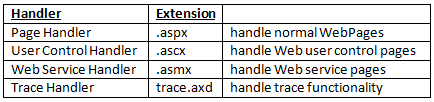
ASP.NET framework offers a few default HTTP handlers. The most common handler is an ASP.NET page handler that processes .aspx files. Following are some default Handlers:
- Page Handler (.aspx): handles Web pages
- User Control Handler (.ascx): handles Web user control pages
- Web Service Handler (.asmx): handles Web service pages
- Trace Handler (trace.axd): handles trace functionality
You can create your own custom HTTP handlers that render custom output to the browser. Typical scenarios for HTTP Handlers in ASP.NET are for example
- delivery of dynamically created images (charts for example) or resized pictures.
- RSS feeds which emit RSS-formated XML
What is HttpHandler?
HttpHandler
HTTPHandlers are used by ASP.NET web application server to handle specific requests based on extensions. HTTPHandlers run as processes in response to a request made to the ASP.NET website. It is a class that implements the System.Web.IHttpHandler interface. Any class that implements the IHttpHandler interface can perform as a target for the incoming HTTP requests.
It is an extension based processor and responsible for fulfilling requests from a browser depending on file extensions. When HttpHandler receives any request from browser, it checks the extension to see if it can handle that request and performs some predefined steps to respond that request.
ASP.NET framework offers a few default HTTP handlers. The most common handler is an ASP.NET page handler that processes .aspx files. Following are some default Handlers:
How to implement HTTPHandler ?
Any class that implements the IHttpHandler interface can perform as a target for the incoming HTTP requests. The class should have a method ProcessRequest and a property called IsReusable.
C# Source Code
Explain the difference between user control and custom control. Also, explain their use.
What is a Custom Control?
A custom control is a loosely coupled control defined in a class, which derives from
Control. The UI of the custom control is generally defined in a Resource Dictionary inside the resource file. We can create themes for a custom control and reuse it in various projects very easily.Button, CheckBox, TextBox etc., even a UserControl is nothing but a Custom Control. You can easily load them inside an XAML page
A Custom Control generally inherits from the
System.Windows.Controls.Control class. You may derive from a different custom control depending on your requirement.
Custom Controls are compiled into a DLL assembly and can be reused in multiple places very easily. You have total control over the code, thus gives you more flexibility to extend the behaviour. Once you build and add a reference of the custom control in your project, you can find it in the
toolbox. Thus, you will be able to drag and drop the control in your Design view and start working with it very easily.What is a User Control?
The base "
UserControl" is nothing but a Custom Control that you derive to create a control UI specific to your project. Generally, we create a UserControl which is placed inside an XAML page with tight bonding to the code behind. You can directly access its UI elements from the code-behind and do some specific operations.
A custom
UserControl inherits from the System.Windows.Controls.UserControls class, which inherits from the base "Control" class.
You can't create theming support for
UserControls but can style them by creating themes for the child Custom Controls because they represent a collection of controls. Once you create a UserControl UI in one project, you can't change it in other projects.Difference Between a CustomControl and a UserControl
So now you have got the difference between a Custom Control and a User Control, I guess. Let's summarize the differences again. Read the comparison below to make things clear:
| Custom Control | User Control |
| A loosely coupled control w.r.t code and UI | A tightly coupled control w.r.t code and UI |
Derives from Control | Derives from UserControl |
Defines UI in a ResourceDictionary | Defines UI as normal XAML |
| UI is skinable | Child controls are skinable |
| Has dynamic layout | Has static layout |
| UI can be changed in different projects | UI is fixed and can't have different looks in different project |
| Has full toolbox support | Can't be added to the toolbox |
| Defines a single control | Defines a set of controls |
| More flexible | Not very flexible like a Custom Control |
| Requires in-depth knowledge of Silverlight UI Model | Does not require indepth knowledge of the UI Model |
Hope you now have a better understanding from the above comparison table.
When to Use?
Good question: "When to use a Custom Control?" Haven't you got the inner meaning of it yet? OK, read the summarized points below:
- When you have a rapid and fixed content in your UI, use
UserControl. - When you want to separate some basic functionality of your main view to some smaller pieces with reusability, use
UserControl. - When you want to use your control in different projects and each project may want to change the look, use
CustomControl. - When you want to implement some additional functionality for a control, create a
CustomControlderived from the base control. - When you want to apply themes to your controls, use
CustomControl. - When you want to add toolbox support for your control, so that your user will be able to do drag and drop to the designer, use
CustomControl.
What is data contract in WCF?
A data contract is a formal agreement between a service and a client that abstractly describes the data to be exchanged.
- Data contract can be explicit or implicit. Simple type such as int, string etc has an implicit data contract. User defined object are explicit or Complex type, for which you have to define a Data contract using [DataContract] and [DataMember] attribute.
- WCF uses a serialization engine called the Data Contract Serializer by default to serialize and deserialize data.We can also explicitly create a data contract by using DataContractAttribute and DataMemberAttribute attributes. This attribute can be applied to classes, structures, and enumerations.
- The DataMemberAttribute attribute must then be applied to each member of the data contract type to indicate that it is a data member, that is, it should be serialized.
- Data Contracts can be defined as follows:
• It describes the external format of data ed to and from service operations
• It defines the structure and types of data exchanged in service messages
• It maps a CLR type to an XML Schema
• It defines how data types are serialized and deserialized. Through serialization, you convert an object into a sequence of bytes that can be transmitted over a network. Through deserialization, you reassemble an object from a sequence of bytes that you receive from a calling application.
• It is a versioning system that allows you to manage changes to structured data .
- Namespace for holding DataContract and DataMember attributes.
System.Runtime.Serialization
Example :
Example :
- Create User defined data type called Customer. This data type should be identified for serialization and deserialization by mentioning with [DataContract] and [DataMember] attribute.
- Add Wcf Service at DataContractinWCF.Web(Silverlight Web Project),We get IService1.cs and Service1.svc files.
- IService1.cs :namespace DataContractinWCF.Web
{
[ServiceContract]
public interface IService1 {
[OperationContract]
List<Customer> GetCustomerData(int CustomerID);
}[DataContract]
public class Customer
{
private string m_Name;
private int m_Age;
private int m_Salary;
private string m_Designation;
private string m_Manager;[DataMember]
public string Name
{
get { return m_Name; }
set { m_Name = value; }}[DataMember]
public int Age
{
get { return m_Age; }
set { m_Age = value; }
}[DataMember]
public int Salary
{
get { return m_Salary; }
set { m_Salary = value; }
}[DataMember]
public string Designation
{
get { return m_Designation; }
set { m_Designation = value; }
}[DataMember]
public string Manager
{
get { return m_Manager; }
set { m_Manager = value; }
}
}
In GetCustomerData method we have created the Customer instance and return to the client.
As we have created the data contract for the Employee class, client will aware of this instance whenever he creates proxy for the service.
- Service1.svc.cs :namespace DataContractinWCF.Web{public classService1 : IService1{
public Cusomer GetCustomerData (int empId){Cusomer CusDetail = new Cusomer ();//Do something to get Customer details and assign to CusDetail propertiesreturn CusDetail;}} - Client Side
On client side we can create the proxy for the service and make use of it. The client side code is shown below.
Build Web project and then Add Service reference to client side.Now we can access the service methods at client side.
On button click event access the service as follows :Public void btnGetDetails_Click(object sender, EventArgs e){ServiceReference1.Service1Client service = new ServiceReference1.Service1Client();Cusomer CusDetails;CusDetails = service.GetCustomerData(CusomerId);//Do something on Customer details}
What is Instance mode in wcf?
Instance mode is basically a service side implementation detail. It should not manifest itself on the client side. WCF defines the behaviors. Behavior is a local attribute of a service or client that does not affect communication. The client never knows about the service behavior and does not manifest service binding or published metadata.
For service instance mode we use the ServiceBehaviour attribute that defines the InstanceContextMode property of the enum type InstanceContextMode. the value of the InstanceContextMode enum defines which instance mode is used for the service.
InstanceContextMode:public enum InstanceContextMode{
PerCall,
PerSession,
Single
}
Instance Modes available in WCF are:
For service instance mode we use the ServiceBehaviour attribute that defines the InstanceContextMode property of the enum type InstanceContextMode. the value of the InstanceContextMode enum defines which instance mode is used for the service.
InstanceContextMode:public enum InstanceContextMode{
PerCall,
PerSession,
Single
}
Instance Modes available in WCF are:
- PerCall
- PerSession
- Single
PerCall Services
When a service is configured PerCall, every client gets a new service instance. The above diagram shows how a PerCall instance works:
- Client calls the proxy and proxy forwards the call to service
- WCF creates an instance and calls the method call.
- When method call returns, WCF calls IDisponsible if implemented.
The following explains the PerCall Instance method with an example.
Step 1: Create a service with a default contract name, in other words IService1, and implement the interface as in the following:[ServiceContract]public interface IService1{
[OperationContract]
int RetVal();
}
Step 2: In the implementation of the RetVal operation, increment the "_counter". When the client calls the service, the "_counter" variable is incremented and returned to the client.
Step 1: Create a service with a default contract name, in other words IService1, and implement the interface as in the following:[ServiceContract]public interface IService1{
[OperationContract]
int RetVal();
}
Step 2: In the implementation of the RetVal operation, increment the "_counter". When the client calls the service, the "_counter" variable is incremented and returned to the client.
[ServiceBehavior(InstanceContextMode = InstanceContextMode.PerCall)]
public class Service1 : IService1
{
private int _counter;
public int RetVal()
{
_counter++;
return _counter;
}
}
Step 3: When we invoke this method with the client, each time we get the same value.
var proxy = new Service1Client();
MessageBox.Show(proxy.RetVal().ToString());
MessageBox.Show(proxy.RetVal().ToString());
Benefits of PerCall
Step 3: When we invoke this method with the client, each time we get the same value.
var proxy = new Service1Client();
MessageBox.Show(proxy.RetVal().ToString());
MessageBox.Show(proxy.RetVal().ToString());
Benefits of PerCall
- Less Memory consumption
- Increased throughput
- Concurrency is not an issue
Drawback of PerCall
State is not mentioned between calls.
PerCall Configuration
To Configure a Service type as PerCall, we can apply the ServiceBehaviour attribute with InstanceContextMode Property as PerCall.
[ServiceContract]
interface IMyContract
{...}
[ServiceBehavior(InstanceContextMode = InstanceContextMode.PerCall)]
class MyService : IMyContract
{...}
PerSession Service
WCF maintains a logical session between client and service in Persession instance mode. A new instance of the service class is created for each client.
The following given diagram represents the request from the client using Persession service instance mode:
Let us understand Persession service instance mode with example.
State is not mentioned between calls.
PerCall Configuration
To Configure a Service type as PerCall, we can apply the ServiceBehaviour attribute with InstanceContextMode Property as PerCall.
[ServiceContract]
interface IMyContract
{...}
[ServiceBehavior(InstanceContextMode = InstanceContextMode.PerCall)]
class MyService : IMyContract
{...}
PerSession Service
WCF maintains a logical session between client and service in Persession instance mode. A new instance of the service class is created for each client.
The following given diagram represents the request from the client using Persession service instance mode:
Let us understand Persession service instance mode with example.
Step 1: We just change InstanceContextMode PerCall to PerSession in the above example.
[ServiceBehavior(InstanceContextMode = InstanceContextMode.PerSession)]
Step 2: When we run the following code on the client side, we see the value 2 after the final client code is executed. If we call the method two times then the Value will be shown as 2.
var proxy = new Service1Client();
MessageBox.Show(proxy.RetVal().ToString());
MessageBox.Show(proxy.RetVal().ToString());
Benefit of PerSession
The state is maintained by a service instance.
Drawbacks of PerSession
- Less throughput, greater memory consumption
- Concurrency issues for multithreaded clients
Single Instance Service
When we configure a service as a singleton, all clients are connected to a single instance context. We configure a singleton service by setting the InstanceContextMode property as single. Only one instance is created upon creation of a service host. This instance is forever for the service. Another service instance is created only when we reset the IIS or when the service host is shut down.
Diagrammatic representation of a singleton instance:
When we configure a service as a singleton, all clients are connected to a single instance context. We configure a singleton service by setting the InstanceContextMode property as single. Only one instance is created upon creation of a service host. This instance is forever for the service. Another service instance is created only when we reset the IIS or when the service host is shut down.
Diagrammatic representation of a singleton instance:
Let us understand singleton Instance Service mode with an example.
Step 1: We just change InstanceContextMode to Single.
[ServiceBehavior(InstanceContextMode = InstanceContextMode.PerSession)]
Step 2: When two clients request a single instance service, it returns an incremental value, in other words 1 or 2. This is because service instance mode is single. The first client is a WCF Client and the second client is a Windows Application Client. The code for the Windows client is as follows:
var proxy = new Service1Client();
MessageBox.Show(proxy.RetVal().ToString());
MessageBox.Show(proxy.RetVal().ToString());
Step 1: We just change InstanceContextMode to Single.
[ServiceBehavior(InstanceContextMode = InstanceContextMode.PerSession)]
Step 2: When two clients request a single instance service, it returns an incremental value, in other words 1 or 2. This is because service instance mode is single. The first client is a WCF Client and the second client is a Windows Application Client. The code for the Windows client is as follows:
var proxy = new Service1Client();
MessageBox.Show(proxy.RetVal().ToString());
MessageBox.Show(proxy.RetVal().ToString());
Benefit of Single Instance:
State is maintained by the service instance.
Drawbacks of Single Instance
State is maintained by the service instance.
Drawbacks of Single Instance
- Least throughput
- Greater memory consumption
- Concurrency issues
Guidelines for choosing WCF instancing mode
Selecting an instance mode always depends on what a service is trying to do. Normally, for scalability and throughput, we prefer to use PerCall services whereever possible. We should use PerSession only when it is necessary, because it overheads the session and session times out. Also we should try to avoid singleton owing to greater memory consumption. Singleton is, however, useful on client machine for shared functionality. These are only general guidelines.
Selecting an instance mode always depends on what a service is trying to do. Normally, for scalability and throughput, we prefer to use PerCall services whereever possible. We should use PerSession only when it is necessary, because it overheads the session and session times out. Also we should try to avoid singleton owing to greater memory consumption. Singleton is, however, useful on client machine for shared functionality. These are only general guidelines.
What is WCF?
WCF is a Microsoft platform for building distributed and interoperable applications and it keeps data in XML and JSON format that can be understood by any language. WCF service can communicate in XML and JSON message formats with the client.
Message Exchange Pattern in WCF
We know that WCF keeps data in XML or JSON format. When a client sends a request to a service and the service sends a response to the client then the request and response is in XML or JSON format, in other words the message exchange is in the format of XML or JSON between the client and the service.
Now I want to explain why we need the Message Exchange Pattern:
WCF is a Microsoft platform for building distributed and interoperable applications and it keeps data in XML and JSON format that can be understood by any language. WCF service can communicate in XML and JSON message formats with the client.
Message Exchange Pattern in WCF
We know that WCF keeps data in XML or JSON format. When a client sends a request to a service and the service sends a response to the client then the request and response is in XML or JSON format, in other words the message exchange is in the format of XML or JSON between the client and the service.
Now I want to explain why we need the Message Exchange Pattern:
- When we want the calling of the function to not take more time
- We just want to call the function and not want wait for the response.
- When we want that function call is not blocking and at the same time we want something out of the function (response) for our application.
- When we want a two-way communication mechanism.
In WCF there are the following 3 types of Message Exchange Pattern:
- Request/Response
- One way
- Duplex
1. Request/Response
This is the default Message Exchange Pattern. In this pattern the client sends a request to the server and it waits for the response until the server does not stop processing, for example if the client a sends a request to get the name of all users then the service will proceed with it and the client must wait for a response when the service sends a result then the client is free. if we use the void keyword then it will also take more time. The one property to set the pattern of request/response is IsOneWay=false and all the WCF bindings except MSMQ based binding supports the request/response.
By using this diagram it can be easily understood that when the client sends a request it must wait for a response until the WCF process is not finished.
Now I will explain the request/response with the following example.
Step 1: Open Visual Studio 2010.
Step 2: Now go to "New Project" > "WCF" > "WCF Service Application" and add the name of the service.
Step 3: Now after declaring the method inside in the interface here the OperationContract attribute is present in the Message Exchange Pattern and the IsOneWay=false setting shows the Request-Reply Message pattern setting.
By using this diagram it can be easily understood that when the client sends a request it must wait for a response until the WCF process is not finished.
Now I will explain the request/response with the following example.
Step 1: Open Visual Studio 2010.
Step 2: Now go to "New Project" > "WCF" > "WCF Service Application" and add the name of the service.
Step 3: Now after declaring the method inside in the interface here the OperationContract attribute is present in the Message Exchange Pattern and the IsOneWay=false setting shows the Request-Reply Message pattern setting.
- // specifies the request-reply message pattern
- [OperationContract(IsOneWay=false)]
- //declare the method which return type is string
- string RequestReplyPattern();
Now to implement the code in the .cs file.
- public string RequestReplyPattern()
- {
- //using the namespace using System.Threading for sleep the thread in 2 minute
- Thread.Sleep(2000);
- //return the date and time
- return "current time of Service is" + DateTime.Now.ToString();
- }
And then after running the service.
Step 4: Now add the new item from right clcik on Solution Explorer and "Add" > "New Item" > "Web Form".
Now get the controls on Web Form for a Button and 2 labels.
Step 4: Now add the new item from right clcik on Solution Explorer and "Add" > "New Item" > "Web Form".
Now get the controls on Web Form for a Button and 2 labels.
- <%@ Page Language="C#" AutoEventWireup="true" CodeBehind="WebForm1.aspx.cs" Inherits="Message_Contract.WebForm1" %>
- <!DOCTYPE html PUBLIC "-//W3C//DTD XHTML 1.0 Transitional//EN" "http://www.w3.org/TR/xhtml1/DTD/xhtml1-transitional.dtd">
- <html xmlns="http://www.w3.org/1999/xhtml">
- <head runat="server">
- <title></title>
- </head>
- <body>
- <form id="form1" runat="server">
- <div>
- <asp:Button ID="Button1" runat="server" onclick="Button1_Click" Text="Button" />
- <br />
- <asp:Label ID="lblPagedate" runat="server"></asp:Label>
- <br />
- <br />
- <asp:Label ID="lblServicedate" runat="server"></asp:Label>
- </div>
- </form>
- </body>
- </html>
Now we need to add the reference of the service so to do that click on Add Service Reference and then a window will open and in it click on Discover and then the service will be shown and add the service.
Code Behind
- //On the button click
- protected void Button1_Click(object sender, EventArgs e)
- {
- // Before service is call the time will show
- lblPagedate.Text = "Page date is " + DateTime.Now.ToString();
- ServiceReference1.Service1Client sc = new ServiceReference1.Service1Client();
- //service is calling and in label, time is show after service will call
- lblServicedate.Text = sc.RequestReplyPattern();
- }
Output
Now from the output the client sends a request from a button to the WCF service and it waits 2 minutes and then it returns the result so for that the client must wait for a response until the WCF service processing is done. If there is an exception then the client also must wait for the response.
The advantages of request/response message pattern is:
Now from the output the client sends a request from a button to the WCF service and it waits 2 minutes and then it returns the result so for that the client must wait for a response until the WCF service processing is done. If there is an exception then the client also must wait for the response.
The advantages of request/response message pattern is:
- Supports all the bindings except MSMQ-based binding
- If an exception occurrs in the service then it immediately informs the client and developer so the developer can easily get the faults in the service.
The disadvantages of the request/response pattern is:
- The client must wait more time since there is so much processing before the service can send the TimeoutException to the client
2. One way
In the previous pattern the client must wait if the return type is void then also so for that in this pattern if the client sends a request to the service then it has no need to wait for the response. This mode is used when we don't want to show any type of error to the client because when we use the Message Exchange Pattern then it doesn't give any message to the client. We can set these patterns using IsOneWay = true in the service, the exception will be thrown if IsOneWay = true is declared in the output parameter, reference parameter or return value. When we use these modes and if the service is busy with the other service and client sends the request then it can keep the request in the Queue and then the client can do his other work, the client is unblocked and we can set the Queue limit of the request.
The diagram shows that only the client can send the message to the service.
Now I am explaining one-way messages with the following example.
Step 3: The remaining steps are the same and declares the method in the interface and sets the property of OneWay:
Now I am explaining one-way messages with the following example.
Step 3: The remaining steps are the same and declares the method in the interface and sets the property of OneWay:
- //Specify the Oneway message exchanging pattern
- [OperationContract(IsOneWay = true)]
- void OneWayMessage();
And now implement the method in the .cs file of the service.
- public void OneWayMessage()
- {
- //using the namespace using System.Threading for sleep the thread in 2 minute
- Thread.Sleep(2000);
- }
Step 4: Now in the web form use this code in the code behind:
- protected void Button1_Click(object sender, EventArgs e)
- {
- //Time show before the service is calling
- lblPagedate.Text = "on the load time the time is " + DateTime.Now.ToString();
- ServiceReference1.Service1Client sc = new ServiceReference1.Service1Client();
- sc.OneWayMessage();
- //after service is calling that time show
- lblServicedate.Text = "After Calling the service the time is " + DateTime.Now.ToString();
- }
Output
Now the output shows that both times are the same but we specify a 2 minute wait in the service. It happens only because the client sends a request to the server it does not wait for the WCF service processing and it gives the response back if an error occurs then the service also doesn't report to the client.
The following are the advantages of OneWay:
- Clients are unaware of any exceptions of the service.
- It takes less time for the process
- the client is not blocked after a request, the client can do his other work.
- This pattern is doing work like asynchronous
The following are the disadvantages of OneWay:
- If the request exceeds the limit of the queue then it can be blocked by the client.
- The client cannot know whether or not the request is reached successfully
3. Duplex
The duplex pattern implements both of the OneWay and Request/Response message patterns. The client and the service both initiate this pattern. This pattern is more complex than other patterns because the additional communication is added. This mode is used when we want to send the notification to the client about his request being reached successfully or not. It doesn't support all bindings.
As shown in the diagram the client sends a request to the service and it processes the request and gives the response but if the user wants to do his other work then it can also do that and the service provides the notification. For the setting of the Duplex pattern we need to use concurrent mode.
- [ServiceBehavior(ConcurrencyMode=ConcurrencyMode.Reentrant)]
- And for synchronizaion in client machine
- [CallbackBehavior(UseSynchronizationContext=false)]
- Or
- IsOneWay=true
For a better understanding of the Duplex pattern I will explain with the following example.
Before procceding we need to see my previous articles and follow the procedure for self hosting that plays an important role in the Duplex Message Exchange Pattern.
Self hosting of wcf service with console application
In the interface declare the following method.
Before procceding we need to see my previous articles and follow the procedure for self hosting that plays an important role in the Duplex Message Exchange Pattern.
Self hosting of wcf service with console application
In the interface declare the following method.
- //associate service contract with service contract using call back attribute
- [ServiceContract(CallbackContract=typeof(IService1CallBack))]
- public interface IService1
- {
- [OperationContract]
- void hello();
- }
- public interface IService1CallBack
- {
- [OperationContract]
- void helloback(string name);
- }
And now implement the method in the .cs of the service:
- //from this setting it allows the call back from the service
- [ServiceBehavior(ConcurrencyMode=ConcurrencyMode.Reentrant)]
- public class Service1 : IService1
- {
- public void hello()
- {
- Thread.Sleep(50);
- string name="Divya";
- //to feed the information in the client side so for associate
- OperationContext.Current.GetCallbackChannel<IService1CallBack>().helloback(name);
- }
- }
And now for hosting code in the Console Application:
- static void Main(string[] args)
- {
- //herre the name of the service which we need to host
- using (ServiceHost host = new ServiceHost(typeof(Duplex_Message_Exchange.Service1)))
- {
- //read the WCF service
- host.Open();
- Console.WriteLine(DateTime.Now.ToString());
- host.Close();
- Console.ReadLine();
- }
- }
And now for testing, create a client to get a new project of a Windows Forms application and here add the reference of the service. For that go to References and Add Service Reference.
And now get 2 controls, a button and a TextBox. And here write the code of code behind:
- [CallbackBehavior(UseSynchronizationContext=false)]
- public partial class Form1 : Form, Duplex_Message_Exchange.IService1CallBack
- {
- public Form1()
- {
- InitializeComponent();
- }
- private void button1_Click(object sender, EventArgs e)
- {
- // and need to create the instance of class, the class is Form1
- InstanceContext instance=new InstanceContext(this);
- //we need to create a instance of proxy class
- Duplex_Message_Exchange.IService1CallBack client = new Duplex_Message_Exchange.IService1CallBack(instance);
- client.hello();
- }
- //this method will be recived the name of the person which service is return
- void helloback(string name)
- {
- textBox1.Text = name.ToString();
- }
- }
Output
Advantages of duplex exchange message pattern.
- The user can get the notification of the service without wait.
- The blocking of the client's work is less
Disadvantages of the duplex exchange message pattern.
- It is more complex.
- It doesn't support all bindings.

No comments:
Post a Comment